Robot Management System: How to Choose an AMR Vendor
November 23, 2026
Choosing a Robot Management System for an AMR Fleet
A robot management system for an AMR fleet should be judged on three things before price: whether it can run the robots and equipment you already have as one system, whether it can exchange work orders with your MES or WMS, and what the quote includes and leaves out. One or two autonomous mobile robots can run on the software that ships with them. Once several robots share the same aisles, doors and elevators, something has to assign tasks and coordinate traffic, and that is the job of the robot management system (also called a fleet manager or robot control system).
This guide is for plant and warehouse teams preparing to contact AMR vendors for the first time. It covers the components you will be buying, seven criteria that separate vendors, what to ask about MES, door and elevator integration, and the cost items that tend to be missing from estimates. If you want the basics first, start with our robot control system guide.
What You Actually Buy: Four Layers
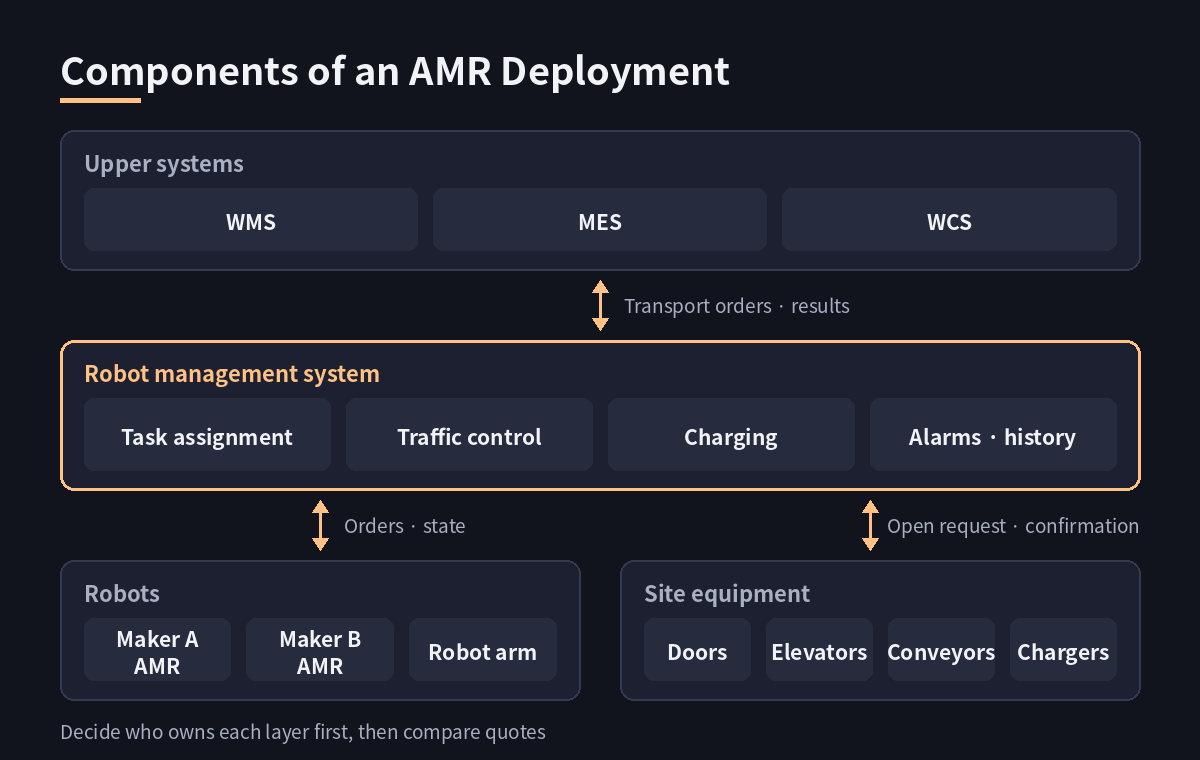
An AMR project is never just robots. Every quote contains the four layers below, and vendors draw the line of their own scope in different places. Split the layers first and decide who owns each one; otherwise two quotes cannot be compared.
Robots and top modules
The AMR base and whatever sits on it: a tugger hitch, a lift for pallets or racks, or a conveyor top that hands over boxes. Chargers and spare batteries belong here too.
Robot management software
It decides which robot takes which transport, sets the order at narrow aisles and intersections so robots do not block each other, and sends robots to charge before they run out. Some systems come from the robot maker and manage only that maker's robots; others are vendor-neutral.
Integration with upper systems
The MES or WMS issues "move this material from A to B", the management system passes it to a robot and reports back when it is done. Without this link, an operator types every transport into the fleet screen by hand.
Site equipment and network
Automatic doors, fire shutters, elevators and conveyors that robots pass through or exchange loads with, plus wireless coverage along every route. This layer often falls outside the robot vendor's scope, which is why it is where budgets grow later.
Three Kinds of Vendors
Companies that propose AMR fleet control fall into three groups. None is better in general; the right one depends on your site.
- AMR manufacturers sell robots and their own fleet manager together. Features for their own robots run deepest and responsibility is clear. Adding another maker's robots later is often hard.
- Robot management software vendors focus on running robots from different makers on one screen. They fit sites with two or more robot types, now or later. How deep each robot integration really goes needs checking.
- System integrators take robots, software, equipment work and MES integration under one contract. One point of contact is convenient, but find out who wrote the management software and who will maintain it.
Seven Criteria for Selecting an AMR Vendor
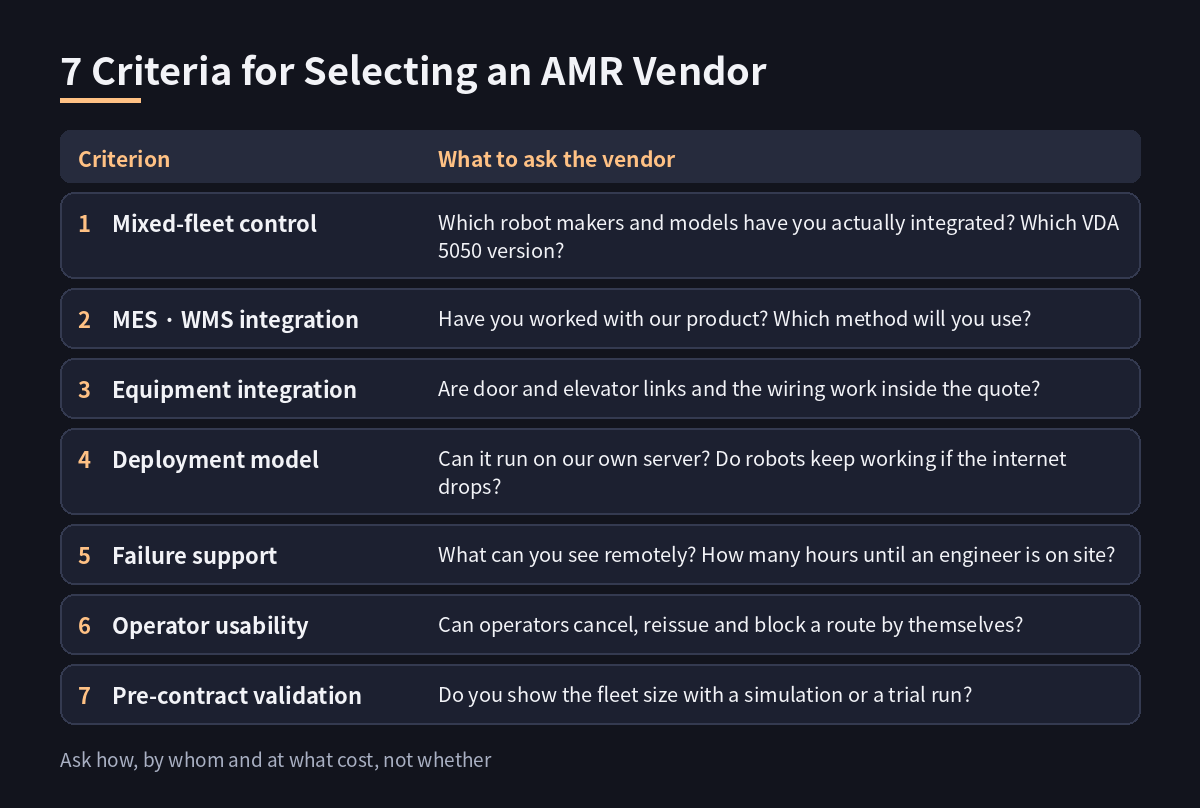
Proposals are full of "yes, supported". For each criterion below, ask how, by whom, and at what cost instead of whether.
1. Can it manage robots from different makers?
Even if you start with one robot type, it is common for another maker's AMR, an autonomous forklift or a robot arm to arrive a few years later. Ask about VDA 5050, the interface standard for mobile robots, but do not stop there. The standard has several versions, so the robot and the management system must support the same one, and actions such as raising a lift or running a conveyor top still have to be matched per robot. The fastest check is a list of robot makers and models the vendor has actually integrated.
2. Has it been integrated with your MES or WMS?
The management system vendor cannot finish integration alone. The other system has to expose a way to send orders and receive results. Ask whether the vendor has worked with the same MES or WMS product and, if not, which method they propose: API, database tables, OPC UA or MQTT.
3. Does the scope include doors and elevators?
More sites than you would expect have robots waiting in front of a closed door. Confirm that the quote covers the link in which the system requests the door to open, waits for the fully-open signal, and only then lets the robot through.
4. Can it run on your own server?
Many plants cannot use an outside cloud for security reasons. Ask whether on-premise installation is possible and who provides the server, redundancy and backup. For a cloud system, ask whether robots finish their current work when the internet link drops.
5. What happens when something fails?
Put it in the contract: whether remote support is available, what the vendor can see remotely (logs, video, robot state), how many hours after a call an engineer arrives on site, and what applies at night and on weekends. Whether spare parts are stocked in your country makes a large difference to uptime.
6. Can operators handle it themselves?
The first person to respond when a robot stops is an operator. Operators should be able to see robot state, cancel or reissue a transport, and block a route temporarily. If even a small route change requires a vendor visit, add that cost to the comparison.
7. Will the vendor validate against your site before the contract?
The number of robots needed to hit your hourly transport count can be calculated from the layout and volume. Ask whether the vendor shows fleet size and congestion points with a simulation, and whether a trial on part of the route is possible. A quote that states a fleet size without a basis usually ends with more robots being added.
What to Ask About MES Integration
Linking an MES to AMR fleet control is a question of scope, not of yes or no. Settle these five points and the gap between vendors' integration quotes becomes understandable.
- What is exchanged. Transport orders (origin, destination, part number, quantity) and completion results are the baseline. Showing robot position, state and estimated arrival in the MES is a separate decision.
- Who starts an order. The MES from the production plan, an operator pressing a call button, or a machine sending a signal. Each needs a different link.
- What happens when an order changes. Cancelling a transport that has already left, or changing its destination. Contracts that skip this point produce the most frequent problems on the floor.
- What happens when the link drops. Whether accepted transports are completed and whether queued results are sent once the link returns.
- Who develops the MES side. Work the MES supplier must do is not in the fleet vendor's quote. You need a separate quote from the MES supplier to see the full amount.
If a site already runs another fleet manager, a new management system can be placed above or beside it without replacing it, provided the existing one accepts orders from outside. The protocols used for these links are listed on our PLC, WMS and MES integration page.
Door and Elevator Integration Checks
For an AMR to pass an automatic door, the management system and the door controller exchange signals. The sequence is simple: as the robot approaches, the system requests the door to open; once the door reports fully open, the robot goes through; after the robot has cleared the doorway, the door closes.
- Does the door controller accept an external signal? If not, an I/O module and wiring are needed. Decide who does that work.
- Is there an open-confirmation signal? Sending a request and driving through after a fixed wait leads to a collision the day the door fails.
- Do fire doors and shutters give priority to the fire signal? In a fire they must close regardless of robot requests, and no robot should be standing underneath.
- Do people and robots share the door? Check that the sensor for people and the signal for robots do not interfere.
Elevators are a step harder. The elevator maker has to supply a device that accepts external calls, and you need an operating rule that keeps robots out while people are riding. If your site has transport between floors, tell vendors the elevator maker and model when you request the quote.
What Costs Do Robotics Vendors Leave Out of Their Estimates?
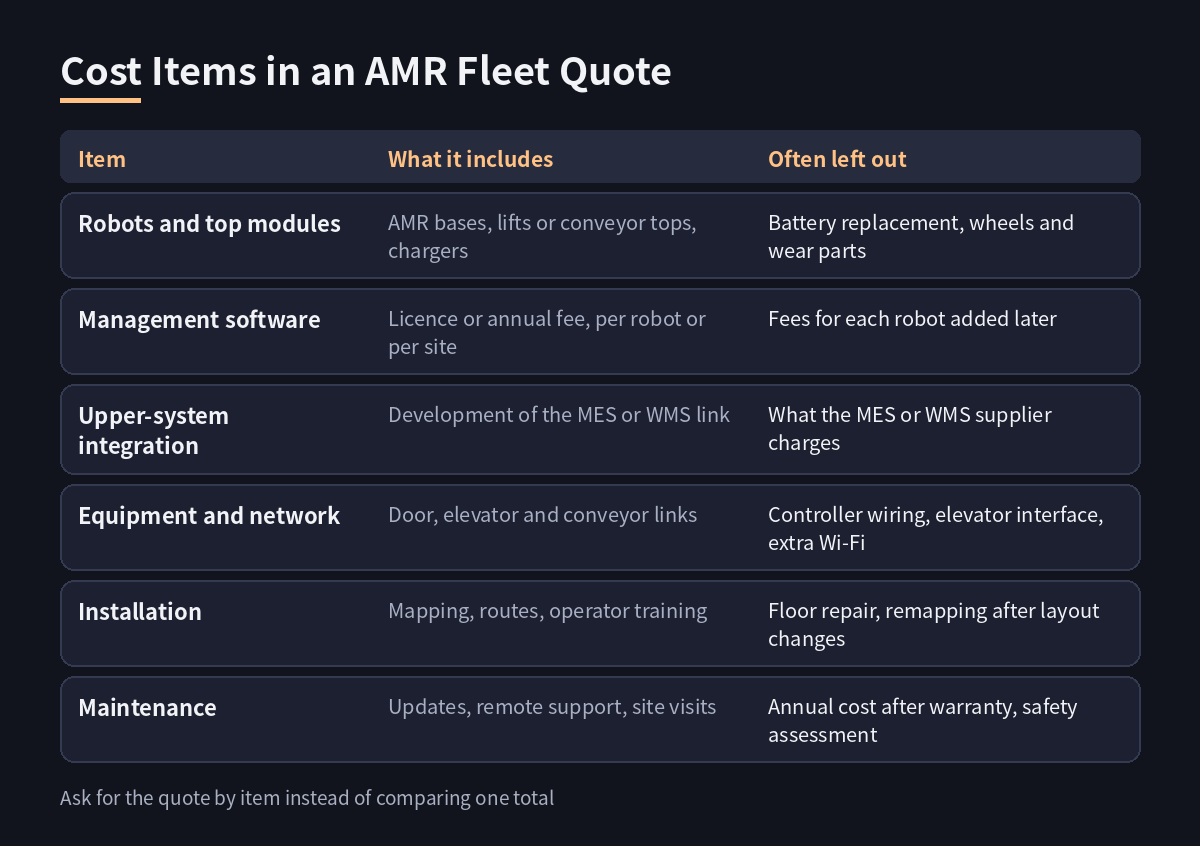
Quotes for AMRs and fleet management vary widely with site conditions, so comparing vendors on a single total leads to the wrong decision. Ask for the quote broken down by item and compare what each item contains.
Items a quote should show
- Robots and top modules. AMR bases, lifts or conveyor tops, chargers, with the basis for the fleet size.
- Management software. Either a one-time licence or an annual fee, usually priced per robot or per site.
- Upper-system integration. The link to MES or WMS. It differs at every site and shows the widest spread between vendors.
- Equipment and network. Door, elevator and conveyor links and added wireless coverage.
- Installation and commissioning. Mapping, routes and stop positions, trial operation, operator training.
- Maintenance. The annual cost after warranty: software updates, remote support, site visits and parts.
Costs that are often missing
The items that later prompt "that was not in the quote" are fairly predictable.
- Development on the other system. What the MES or WMS supplier charges for its side of the link.
- Equipment work. Wiring door controllers and the interface device charged by the elevator maker.
- Floor and aisle repair. Steps, slopes, cracks and drain covers. Anything the robot cannot cross has to be fixed.
- Wireless coverage. Extra access points wherever the signal is weak along a route.
- Batteries and wear parts. Battery replacement interval and price, wheels and similar parts.
- Changes in fleet size and routes. Software fees for each added robot, and remapping when racks are moved.
- Safety assessment. Risk assessment and safety devices for sites where people share the space.
With the items in hand you can calculate payback. The method is in our logistics robot ROI guide, and programs that cover part of the cost in Korea are summarized in the 2027 government support guide.
What to Prepare Before Requesting a Quote
Sending the material below lets vendors size the fleet and the integration scope on evidence, and lets you compare quotes on the same conditions.
- Layout drawing showing aisle widths, doors, elevators, slopes and steps.
- Transport volume: from where to where and how many times per hour, at the busiest time of day.
- Loads: carts, pallets or boxes, with size and weight.
- Existing systems and equipment: MES and WMS products, robots and fleet managers already in place, door and elevator makers.
- Operating conditions: hours, whether routes are shared with people or forklifts, and whether an outside cloud is allowed.
Frequently Asked Questions
How many AMRs before a robot management system is needed?
Shared routes matter more than the count. Two robots that use the same narrow aisle or door already need something to set the order. A site that takes orders from an MES needs a management system for the integration even with one robot.
Can it work with the fleet manager we already use?
Yes, if the existing one can accept orders and report state to an outside system. A common setup keeps each robot maker's fleet manager and puts one management layer above them for a single view.
Is the robot maker's fleet manager enough?
Often, if you have one robot type and plan to keep it that way. Once another maker's robots, robot arms or conveyors have to be coordinated together, a vendor-neutral system becomes necessary.
How long does deployment take?
Integration and equipment work drive the schedule more than robot delivery. Getting the MES development schedule and the door and elevator work schedule before signing reduces delays.
Talk to Roboe Technologies
Roboe Technologies builds logistics robots together with MOROS, its robot management platform. MOROS supports VDA 5050, Modbus TCP, OPC UA and MQTT to connect robots from different makers, conveyors and safety PLCs as one system, and passes work orders from WCS, WMS and MES to the robots. Software is updated remotely, and video from the moment of each alarm is kept automatically so causes can be checked from off site.
See the MOROS product page for details. Send us your layout and transport volume and we will help define the components, integration scope and quote items. Reach us through the contact form.